Vibe Coding with GitHub Copilot: Building an Xbox Gaming Hub
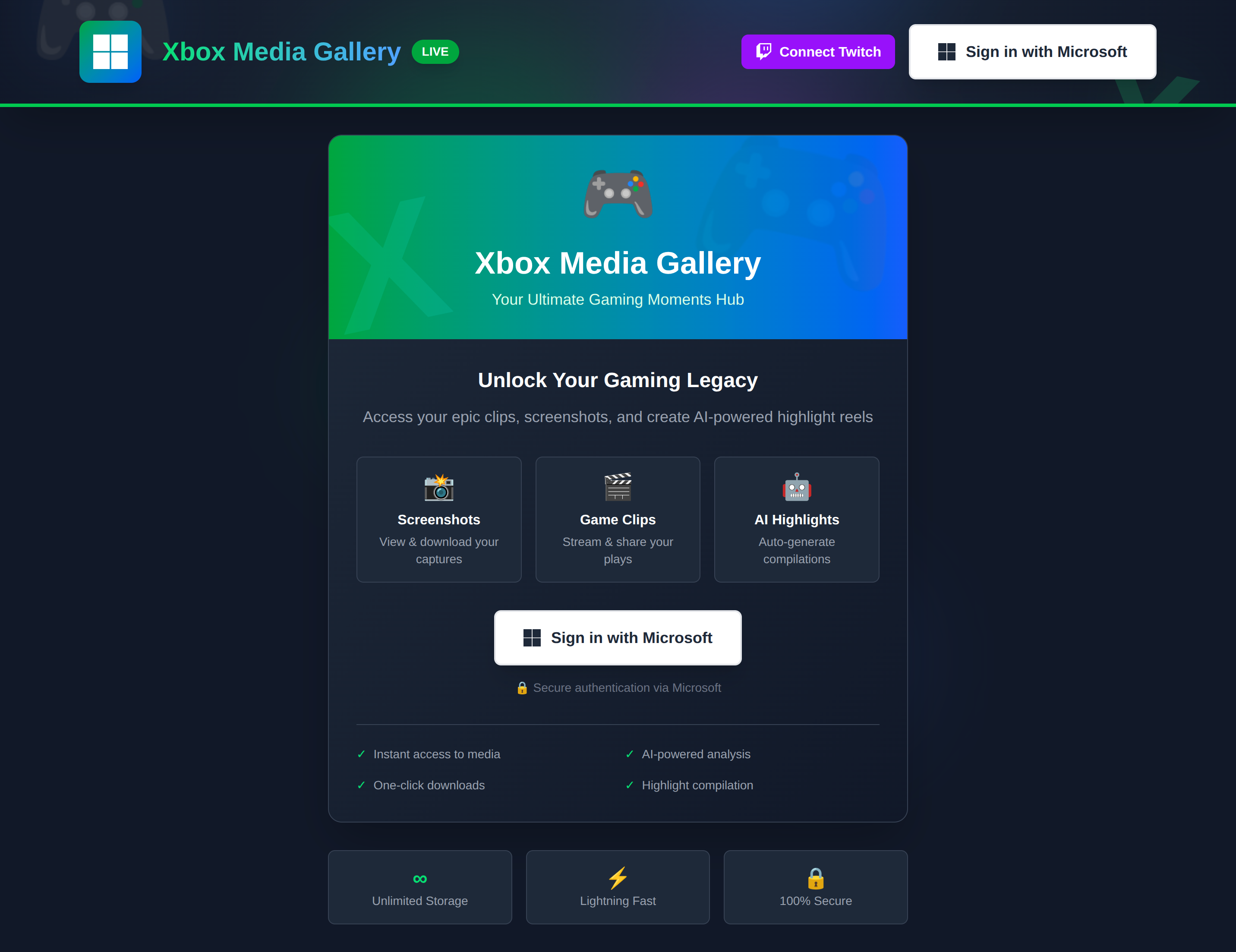
Over the holidays, I decided to try something different: vibe coding. No detailed spec, no architecture diagrams upfront; just an idea and GitHub Copilot's agent mode as my AI pair programmer. The result? A feature-rich gaming hub that connects Xbox Live, Twitch, and Azure AI services.
What is Vibe Coding?
Vibe coding is about following the flow of development without rigid planning. You start with a general idea, let the AI help you explore possibilities, and build features organically as inspiration strikes. It's like pair programming with an incredibly knowledgeable colleague who never gets tired.
The Project: Xbox Clips Gallery
Repository: github.com/troyhite/xbox-clips-gallery
The core concept was simple: "I want to see my Xbox clips and screenshots in one place." But with GitHub Copilot suggesting possibilities at every turn, it evolved into something much more ambitious.
What It Does
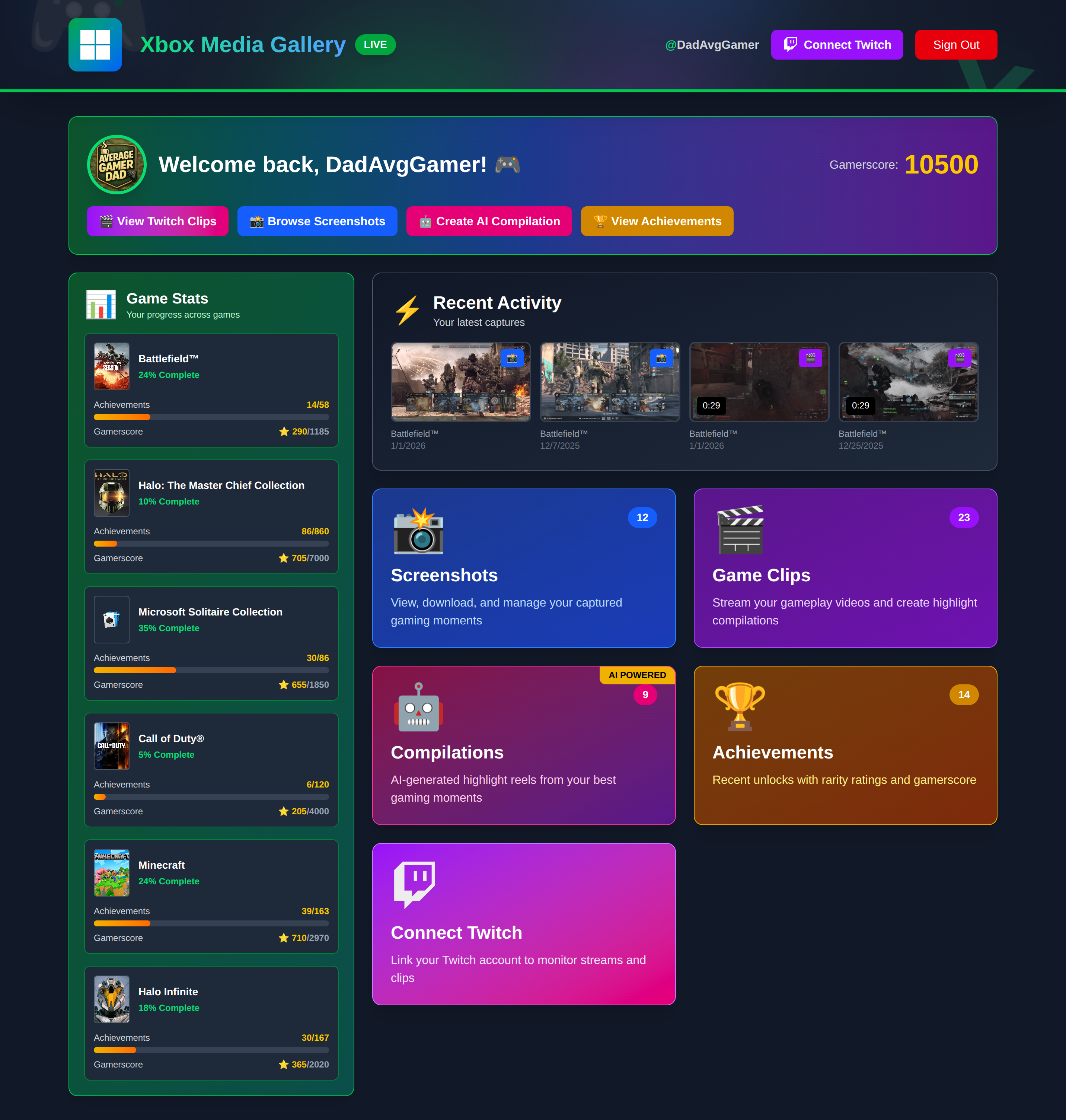
- 📸 Xbox Media Gallery: Browse all your screenshots and video clips from Xbox Live
- 🎬 Video Compilation: AI-powered highlight reel generation using Azure Video Indexer
- 🟣 Twitch Integration: View your Twitch clips alongside Xbox content
- 🔴 Live Stream Monitor: Real-time detection when you go live on Twitch
- 📊 Cross-Platform Analytics: Compare your Xbox and Twitch statistics
- 🏆 Achievement Tracking: View your Xbox achievements with rarity ratings
- 📈 Game Stats Dashboard: Track progress across your recently played games
The Development Journey
Phase 1: Foundation (The "Let's Just Get Started" Phase)
I fired up VS Code on a quiet evening with a simple goal: get Xbox authentication working. No grand plans, no architecture diagrams; just me and GitHub Copilot figuring it out together.
"I need Xbox Live authentication," I typed into the chat.
Within seconds, Copilot scaffolded the entire MSAL configuration, complete with the proper API permissions and redirect URIs. It wasn't just code; it was production-ready boilerplate that understood the nuances of Azure AD app registration. The key learning hit me immediately: Copilot's agent mode excels at scaffolding. It doesn't just give you code; it gives you the right code with the context baked in.
By the end of the session, I had:
- Next.js 16 project with TypeScript configured
- Azure AD app registration connected to Xbox Live
- A complete authentication flow with token management
Phase 2: The Gallery Experience
With authentication working, I started fetching Xbox data. This is where vibe coding truly shined. There was no design doc telling me what components to build; just a conversation with Copilot that felt surprisingly natural.
Copilot responded with a responsive grid featuring thumbnails, view counts, and download buttons. I added it, saw it work, and immediately thought of the next question.
Before I finished thinking it through, Copilot suggested a slide-out panel with metadata, sharing options, and multiple quality downloads. The features emerged from the conversation rather than from requirements. Each small win led to the next idea, creating a development flow that felt more like creative exploration than task completion.
Key additions during this phase:
- Screenshot grid with one-click downloads
- Clips grid with inline video playback
- Media details panel with social sharing
Phase 3: The "What If..." Features
This is where vibe coding becomes addictive. You stop thinking about what you planned and start asking what's possible. And Copilot? It's ready with answers.
"What if we could auto-generate highlight reels?"
I barely finished the question before Copilot was suggesting Azure Video Indexer integration. Together, we built an AI-powered system that analyzes clips, identifies exciting moments based on audio cues and visual patterns, and stitches them into compilations. Copilot even wrote the time-to-seconds conversion utilities when we needed to merge highlight timecodes across multiple videos.
The result:
- Complete Azure Video Indexer integration
- Highlights detection using AI insights
- Compilation generation pipeline with real-time progress tracking
- Azure Blob Storage for hosting compiled videos
"What if we added Twitch integration?"
Why stop at Xbox? Copilot helped me expand the vision to include Twitch streaming. We implemented OAuth flow, built a unified clips view that merged Xbox and Twitch content, and added live stream monitoring that polls the Twitch API every 60 seconds. The cherry on top? One-click highlight clip creation while you're streaming (something I hadn't even thought to ask for, but Copilot suggested based on the Twitch API capabilities).
"What if we showed achievement progress?"
The game stats dashboard became one of my favorite features. We pulled achievement data from Xbox Live, created visual progress bars with rarity ratings, and built a sidebar showing completion percentages for recently played games. Each feature built on the last, creating a cohesive gaming hub.
Phase 4: Polish and Performance
Once the features were flowing, Copilot shifted gears to help with optimization. It recommended Next.js standalone mode for faster Azure deployments, suggested Application Insights for telemetry, and reminded me to add health check endpoints for the App Service. Even in the polish phase, it was teaching me best practices I'd have otherwise researched for hours.
The Technology Stack
Frontend
- Next.js 16 with App Router and Turbopack
- TypeScript for type safety
- Tailwind CSS for rapid UI development
Backend & APIs
- Xbox Live API for gaming data
- Twitch Helix API for streaming integration
- Azure Video Indexer for AI-powered video analysis
- Azure Blob Storage for compilation videos
Authentication & Cloud
- MSAL (Microsoft Authentication Library)
- Azure AD for Xbox authentication
- Azure App Service for hosting
- Application Insights for monitoring
Copilot's Best Contributions
API Integration Expertise
When connecting to Xbox Live's REST API, Copilot knew the exact endpoints, headers, and token formats. It even caught edge cases like token expiration and refresh flows.
Component Architecture
Copilot suggested clean component separation:
ClipsGridvsTwitchClipsGridfor platform-specific logicMediaDetailsPanelas a reusable componentStatisticsDashboardfor analytics visualization
Error Handling & Edge Cases
Without prompting, Copilot added:
- Loading states for async operations
- Error boundaries with user-friendly messages
- Retry logic for failed API calls
- Token validation and refresh mechanisms
Azure Best Practices
Copilot recommended:
- Using
DefaultAzureCredentialfor local/cloud auth flexibility - Implementing health check endpoints for App Service
- Structuring API routes for optimal serverless performance
Challenges & Solutions
Multi-Video Compilation
Azure Video Indexer analyzes one video at a time, but I wanted compilations across multiple clips.
Copilot suggested analyzing clips in parallel, then merging highlight timecodes with proper offset calculations. It even wrote the time-to-seconds conversion utilities.
Twitch Live Detection
How do you know when a user goes live without webhooks?
Copilot proposed polling the Twitch API every 60 seconds and caching the stream state. It also suggested showing stream metadata (viewers, uptime, game) and enabling clip creation with one click.
Cross-Platform Analytics
Combining Xbox and Twitch data for meaningful insights.
Copilot created aggregation logic that normalized data structures and calculated combined statistics like total views and top games across platforms.
What I Learned About Vibe Coding
The Good
✅ Faster Prototyping: Features went from idea to working code in minutes
✅ Discovery-Driven: AI suggestions led to features I wouldn't have considered
✅ Reduced Context Switching: Copilot handles boilerplate while I focus on architecture
✅ Learning Accelerator: I learned Azure Video Indexer and Twitch APIs on the fly
The Tradeoffs
⚠️ Tech Debt Accumulates: Easy to add features without refactoring
⚠️ Testing Gaps: Unit tests weren't part of the "vibe"
⚠️ Architecture Drift: Without upfront planning, some components became bloated
⚠️ Over-Engineering Risk: AI might suggest complex solutions when simple ones work
Best Practices I Discovered
-
Start with Types: Define TypeScript interfaces early. Copilot uses them to generate better code.
-
Commit Often: Vibe coding can move fast. Commit working features so you can rollback if needed.
-
Periodic Refactoring: Every few features, stop and clean up. Don't let technical debt compound.
-
Ask "Why": When Copilot suggests something, ask it to explain. Great learning opportunity.
-
Know When to Plan: Core architecture decisions (database choice, auth strategy) deserve traditional planning.
The Results
In about a week of evening coding sessions, I built:
- 11 React components with responsive design
- 15 API routes handling Xbox, Twitch, and Azure services
- Multi-platform authentication with token management
- AI-powered video analysis and compilation generation
- Real-time stream monitoring with automatic clip creation
- Comprehensive analytics across gaming platforms
All of this with GitHub Copilot handling:
- 60-70% of boilerplate code
- 80%+ of API integration details
- 100% of initial component structure
- Most TypeScript type definitions
Would I Vibe Code Again?
Absolutely, but with boundaries.
Vibe coding is perfect for:
- 🧪 Prototypes and POCs: Get ideas working fast
- 🎨 Personal Projects: When you're learning and exploring
- 🚀 Hackathons: Time-boxed feature sprints
- 💡 Feature Exploration: Testing ideas before committing to them
It's less suitable for:
- 🏢 Production Systems: Need formal planning and testing
- 👥 Team Projects: Requires shared architectural understanding
- 🔒 Security-Critical Code: Deserves careful review and auditing
- 📊 Long-Term Maintenance: Technical debt becomes expensive
Try It Yourself
The Xbox Clips Gallery is open source on GitHub. Clone it, set up your Azure and Twitch credentials, and explore what vibe coding with Copilot can do.
Quick Start:
git clone https://github.com/troyhite/xbox-clips-gallery.git
cd xbox-clips-gallery
npm install
# Add your environment variables to .env.local
npm run dev
Final Thoughts
GitHub Copilot's agent mode transformed how I approach side projects. Instead of spending hours on setup and boilerplate, I could focus on the creative parts: designing user experiences, exploring Azure services, and connecting interesting APIs.
The key is treating Copilot as a pair programmer, not a replacement for thinking. You still drive the architecture, make the tough decisions, and ensure code quality. But for the mechanical parts? Copilot accelerates you from idea to working feature faster than ever before.
Vibe coding isn't about coding without thinking. It's about thinking without waiting.
Want to discuss vibe coding, AI-assisted development, or gaming APIs? Find me on GitHub or LinkedIn.