Split-Brain DNS Architecture for Azure Web Applications
A while back I had the opportunity to author an article for the official Azure Architecture Center on implementing split-brain DNS configurations for web applications. This architecture pattern solves a common challenge: how do you efficiently serve both external internet customers and internal enterprise users from the same application while maintaining optimal performance and security for each?
Read the full article: Use a split-brain DNS configuration to host a web app in Azure on Microsoft Learn
The Challenge
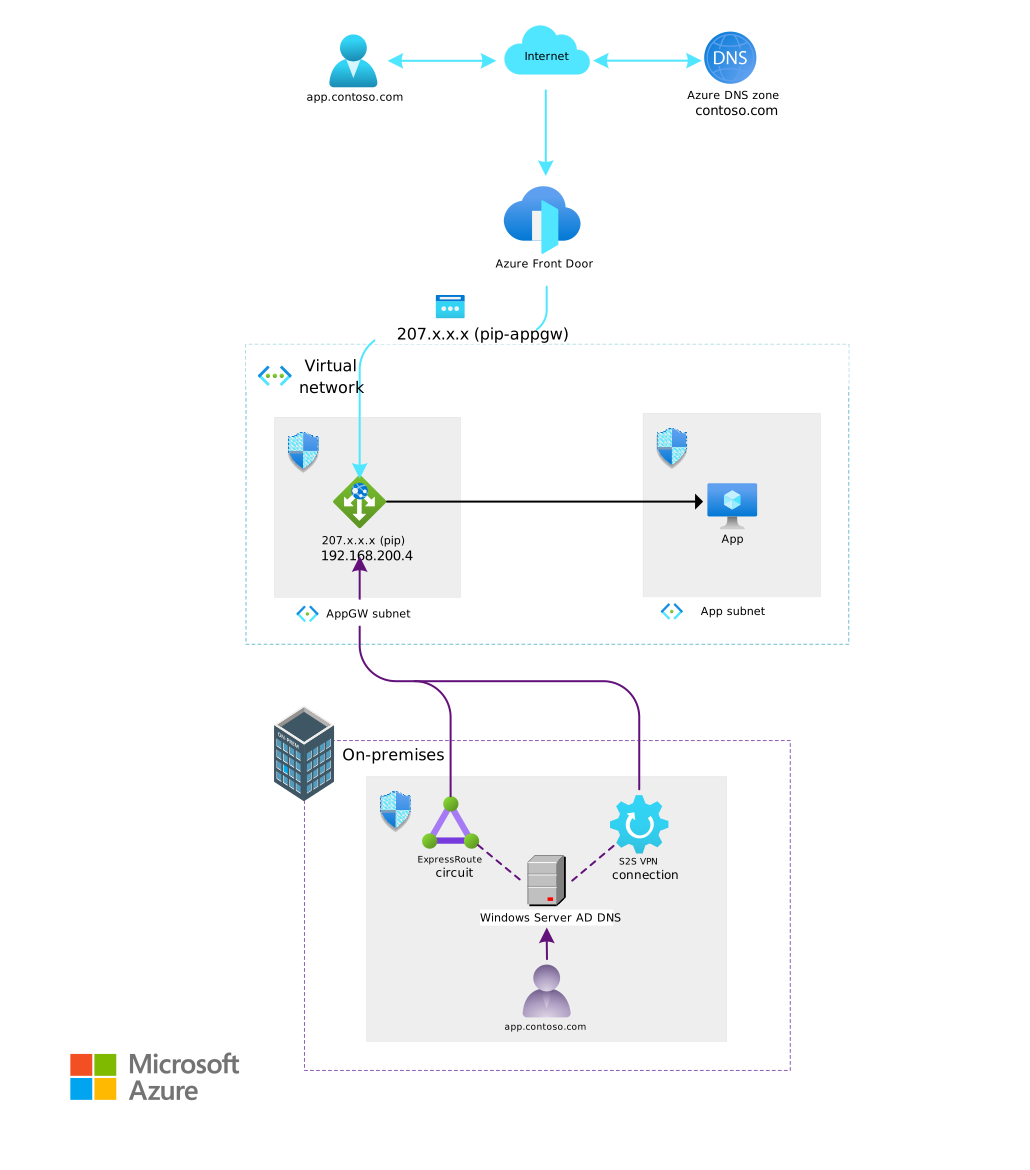
Teams managing workloads often rely on fully qualified domain names (FQDNs) combined with TLS Server Name Indication (SNI). The challenge is that when public customers access from the internet versus when enterprise customers access internally, the traffic should follow different paths with varying levels of security and quality of service.
The Solution
This architecture demonstrates how to differentiate traffic treatment based on DNS configuration and customer origin:
Key Benefits
Fast Global Access
External customers get optimized routing and caching over the internet worldwide
Private Network Access
Enterprise customers access applications without traversing the public internet
Enhanced Protection
Multi-layer WAF protection from common web attacks and malicious traffic
Optimized Routing
Intelligent traffic routing based on customer origin and network path
Architecture Components
Public Internet Workflow
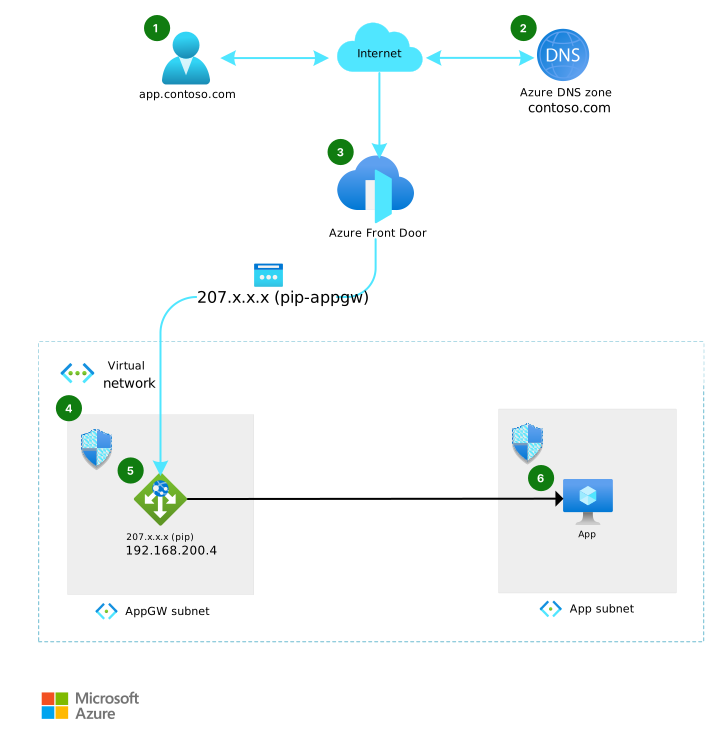
For external customers accessing from the public internet:
- Azure DNS routes requests to Azure Front Door endpoints via CNAME records
- Azure Front Door acts as a global load balancer and WAF, providing:
- TLS termination with SNI certificates
- Caching and optimization
- WAF protection
- Application Gateway receives traffic from Front Door and routes to backend compute
- Network Security Groups restrict traffic to only Azure Front Door's service tag
- Custom WAF rules validate the
X-Azure-FDIDheader to ensure traffic originates from your specific Front Door profile
Private Enterprise Workflow
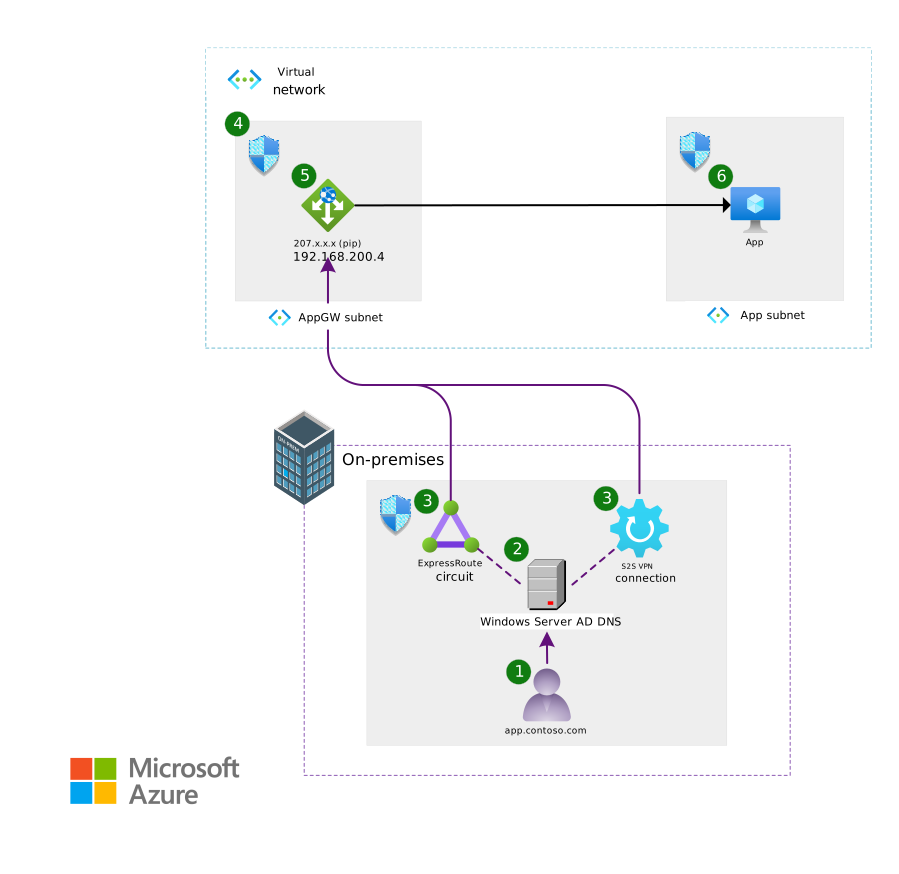
For internal enterprise customers:
- On-premises DNS points application FQDNs directly to Application Gateway's private IP
- ExpressRoute or Site-to-Site VPN provides private connectivity
- Network Security Groups allow only traffic from trusted on-premises networks
- Application Gateway routes internal traffic directly to backend compute without traversing the public internet
Key Components
- Azure DNS: Public DNS zone with CNAME records for Front Door endpoints
- Azure Front Door: Global load balancer and WAF for external traffic
- Application Gateway: Regional load balancer and WAF for both external and internal traffic
- ExpressRoute: Private connectivity between on-premises and Azure
- Azure DNS Private Resolver: Enables on-premises DNS resolution for hybrid scenarios
Architecture Considerations
Reliability
- Deploy across multiple availability zones for redundancy
- Implement health probes for real-time monitoring
- Regularly update DNS records and maintain a disaster recovery plan
- Use Azure Monitor with alerts for anomaly detection
Security
- Apply Zero Trust principles with explicit identity verification
- Use WAF on Application Gateway to protect against web vulnerabilities
- Implement network segmentation and micro-segmentation
- Validate Azure Front Door traffic with custom headers
- Use NSGs to restrict traffic sources
Cost Optimization
- Use autoscaling on Application Gateway based on traffic demand
- Consider zone-redundant SKUs to reduce instance requirements
- Evaluate if Azure Front Door is necessary - for scenarios without global access requirements, you can route directly to Application Gateway
- Right-size backend compute resources based on actual workload needs
Alternative Approaches
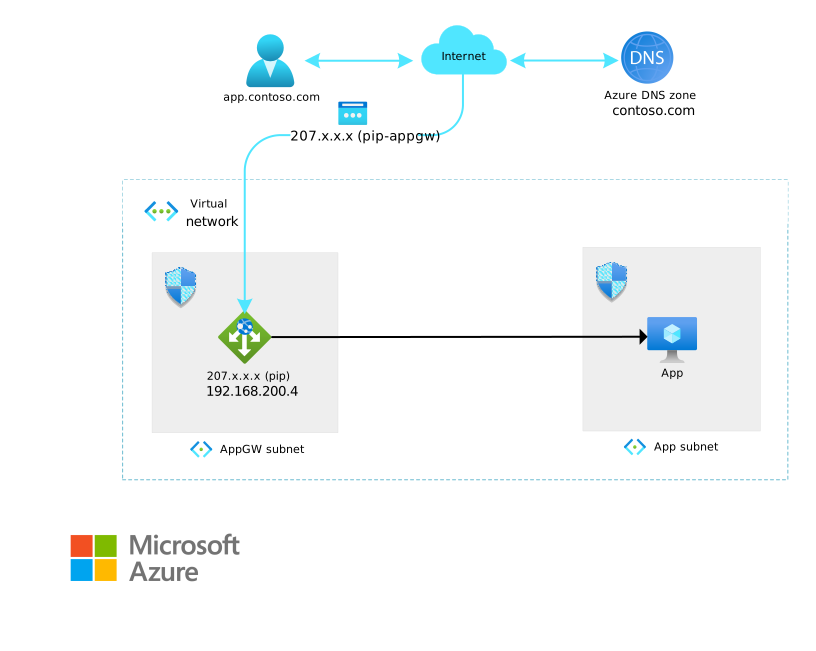
For scenarios that don't require global distribution or Front Door's advanced features:
- Point public DNS directly to Application Gateway's public IP
- Note: This approach loses Front Door's caching, global distribution, and edge optimization capabilities
Other alternatives include:
- Azure Traffic Manager for DNS-based routing (lacks WAF and caching)
- Azure Load Balancer for TCP/UDP traffic (lacks Layer 7 features)
Use Cases
🔀 Split-Brain DNS
Different routing for internal vs. external customers with separate DNS configurations
📈 Application Scalability
Traffic distribution across backend resources with horizontal scaling support
☁️ Hybrid Cloud
Both cloud and on-premises access patterns with seamless connectivity
🌐 Global Distribution
Worldwide content delivery with regional private access capabilities
Implementation Tips
-
Start with DNS planning - Map out your public and private DNS configurations before deploying infrastructure
-
Test connectivity paths - Verify both internet and private network paths work correctly
-
Monitor continuously - Set up comprehensive monitoring and alerting from day one
-
Document thoroughly - Split-brain configurations can be complex - maintain clear documentation
Learn More
The full article on Microsoft Learn includes:
- Detailed workflow diagrams
- Component selection guidance
- Well-Architected Framework considerations
- Cost estimation examples
- Downloadable Visio architecture files
Read the complete article on Microsoft Learn →
This article was originally published on the Azure Architecture Center as part of my work as a Cloud & AI Infrastructure Solution Engineer at Microsoft. Special thanks to my co-contributors: Mays Algebary, Adam Torkar, and Michael McKechney.