Azure VM Lifecycle Changes: What the September 28 Announcement Means for Your Estate
On September 28, Microsoft published Get transparency and predictability with the Azure Virtual Machine lifecycle. It reads like a policy update, but I'd consider it the most important announcement for Azure IaaS planning in a while.
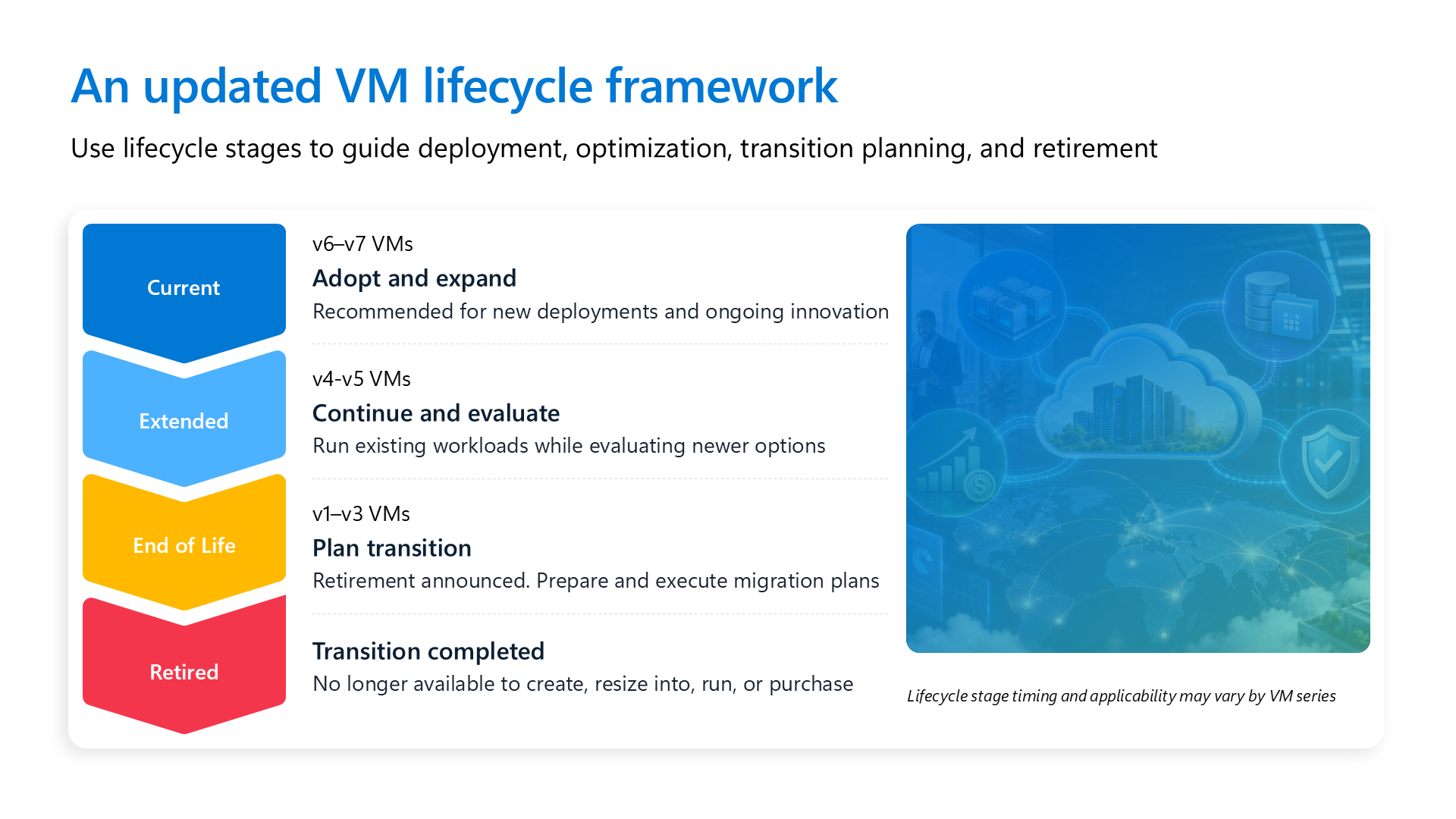
For years, "how long can I keep running this VM size?" didn't have a clear answer. You found out a series was retiring when the retirement email arrived. Now Microsoft has defined the stages and published commitments for what happens at each one.
The announcement also included retirements, capacity changes, and pricing updates with specific dates. If you run VMs on Azure, especially older D-series and E-series, you'll need to account for these in your planning.
Four changes in one announcement
The September 28 announcement included four updates:
Lifecycle framework
Four stages (Current, Extended, End of Life, Retired) with clear guidance for how VM generations evolve over time.
v3 retirements
Dv3, Dsv3, Ev3, and Esv3 enter End of Life and retire on November 15, 2029.
Capacity
Previously announced capacity growth restrictions on select v4 series have been lifted.
Pricing
v1–v2 VM price updates, plus select VM and Storage price updates in seven Azure regions, starting February 1, 2027.
Each change comes with months or years of notice, giving you time to plan before it takes effect.
The new Azure VM lifecycle
Microsoft describes three goals for the lifecycle: transparency into a technology's stage and Microsoft's investment in it, predictability through defined stages and advance notice, and guidance to help customers modernize.
The first VM families covered are General Purpose, Memory Optimized, Compute Optimized, and Storage Optimized. Every size series in those families moves through four stages:
Current
Adopt and expandRecommended for new deployments and growth.
Extended
Continue and evaluateSupported for existing workloads while you plan a move to Current.
End of Life
Actively plan transitionRetirement is formally announced.
Retired
Transition completeThe series can no longer be created, resized into, run, or purchased.
For general purpose sizes today, that maps to:
- Current: v6 and v7 series
- Extended: v4 and v5 series
- End of Life: v1 through v3 series with an announced retirement
Other families follow the same model, but the generations in each stage vary. Check the family page in the Azure VM sizes documentation for each series.
Both stages are fully supported, and you can modernize into either one. Extended (v4/v5) is often the easiest first move from End of Life hardware. Current (v6/v7) offers the latest performance, security, and price-performance improvements and is recommended for new deployments.
Workload placement for End of Life VMs
Microsoft will deploy new workload placement capabilities for End of Life VMs. Existing Azure VM SLAs will still be met, but customers may see minor performance variations in rare scenarios. This keeps capacity available for older series while Microsoft continues to invest in new hardware.
I wouldn't panic over this, but I wouldn't assume an End of Life VM needs no attention until its retirement date either.
Capacity restrictions are not retirements
The lifecycle overview on Microsoft Learn makes an important distinction: capacity growth restrictions are separate from lifecycle stages. A capacity restriction means Azure doesn't guarantee capacity for new or scaled-out deployments of a series. It is not a retirement announcement.
A series can have both. Dv3, Dsv3, Ev3, and Esv3 have had capacity growth restrictions since July 2026, and they retire on November 15, 2029.
The dates that matter
Key dates and milestones
The retirement is three years away, but the pricing change is four months away. Plan for the pricing change first.
v3 retirements: Dv3, Dsv3, Ev3, Esv3
These are some of the most widely deployed VM sizes in Azure. Plenty of production estates were built on D-series and E-series v3 sizes in the 2017–2020 era and never moved.
After November 15, 2029, affected VMs can no longer be created, resized into, run, or purchased. Any remaining VMs are deallocated, stop incurring charges, and lose their SLA and support.
Three years may seem like plenty of time, but change windows, image rebuilds, application owner sign-off, and budget cycles all take time. Starting early lets you migrate in waves rather than moving the whole fleet under deadline pressure.
Good news: v4 capacity restrictions are lifted
Microsoft also lifted previously announced capacity growth restrictions on these v4 series:
General purpose
Dv4, Dsv4, Ddv4, Ddsv4, Dav4, Dasv4
Memory optimized
Ev4, Esv4, Edv4, Edsv4, Eav4, Easv4
You can submit quota increase requests through the standard Azure process again. Approvals are still subject to available capacity by VM size and region.
Pricing updates
There are two separate pricing changes, and both take effect February 1, 2027.
v1–v2 VM pricing: roughly 25%
Rates for select v1 and v2 series increase by approximately 25%:
v1 series
Bv1, D, Ds, F, Fs, G, Gs, Ls, NP, and HC
v2 series
Av2, Amv2, Dv2, Dsv2, Fsv2, and Lsv2
How the change interacts with your commitments:
- Reserved VM Instances: Existing reservations keep their benefit through expiration. After expiration, uncovered usage is billed at the applicable rates.
- Savings Plans: Costs reflect the updated underlying VM rates for the affected series.
Your actual impact depends on usage, agreement terms, commitments, region, and migration decisions.
Regional pricing: 8% to 17% in seven regions
Separately, select Azure Virtual Machine and Azure Storage prices increase in seven regions. Microsoft describes this as rationalizing regional pricing to normalize prices and simplify regional deployments.
The regional increases do not apply to everything. Exclusions include:
Excluded VM series
- v1: Bv1, D, Ds, F, Fs, G, Gs, Ls, NP, HC
- v2: Av2, Amv2, Dv2, Dsv2, Fsv2, Lsv2
- v7: Dsv7, Ddsv7, Dlsv7, Dldsv7, Esv7, Edsv7
The v1–v2 series are already covered by the separate v1–v2 price update.
Excluded Storage services
- Azure NetApp Files (Cross Region Replication SKU)
- Azure Container Storage, Azure Managed Lustre
- Azure Files Transaction Optimized SKU
- General Block Blob, Standard Page Blob, Blob features, Change Feed
- Queues, Queues v2, Tables
- Storage Actions, Storage Discovery, Storage Bandwidth, Import/Export
Notice which v7 sizes are excluded
The newest general purpose and memory optimized v7 sizes are excluded from the regional increases. If you run in one of these seven regions, modernizing to Current-stage sizes softens the regional price change too.
Why newer generations usually cost less, not more
In the public cloud, newer hardware usually delivers the same or better capability at the same or lower list price. You can see this in the D-series pricing for a 2 vCPU size:
| Generation | Size | vCPU / RAM | USD / hour | USD / month |
|---|---|---|---|---|
| v1 (2014) | D2 | 2 / 7 GiB | $0.297 | $216.81 |
| v2 (2015) | D2_v2 | 2 / 7 GiB | $0.266 | $194.18 |
| v3 (2017) | D2_v3 | 2 / 8 GiB | $0.212 | $154.76 |
| v4 (2021) | D2_v4 | 2 / 8 GiB | $0.207 | $151.11 |
| v5 (2021) | D2_v5 | 2 / 8 GiB | $0.207 | $151.11 |
| AMD v5 (2022) | D2as_v5 | 2 / 8 GiB | $0.196 | $143.08 |
| AMD v6 (2025) | D2as_v6 | 2 / 8 GiB | $0.202 | $147.46 |
| AMD v7 | D2as_v7 | 2 / 8 GiB | $0.202 | $147.46 |
Illustrative pay-as-you-go list prices before the February 2027 updates. Use the Azure pricing calculator for your region, OS, and agreement.
That D2 from 2014 costs roughly 47% more per month than a D2as_v7 with more memory and a decade of CPU, storage, and networking improvements. Add the v1–v2 price update and the gap widens.
On premises, you'd be locked into a hardware choice for four or five years. In Azure, you can take advantage of each new generation as soon as it's available. The lifecycle policy gives you a defined schedule to plan around.
Treat v6/v7 as a platform upgrade, not a resize
This is the technical detail I see underestimated most often.
Moving from v3 to v6 or v7 takes more than selecting a different size in the portal. The application, its configuration, autoscale rules, and health logic stay the same. You're changing the virtual hardware and the source image that boots on it.
What stays the same
- The application and its configuration
- Autoscale rules
- Health probes and health logic
- Your Azure operating model
What changes
- VM generation (Gen 2 / UEFI)
- Disk interface (SCSI → NVMe)
- Network adapter (MANA)
- Quota family and regional/zonal availability
Four prerequisites to check
Before scheduling the migration, check these four prerequisites. Most only need to be addressed once.
Gen 2 / UEFI
Required for v6/v7. If your source is Generation 1, plan a Gen 2 image with Trusted Launch, or use the in-place Gen 1 → Gen 2 upgrade.
NVMe readiness
Disks are presented over NVMe. The OS and image must support it. Refresh the image or drivers if needed.
MANA readiness
Networking uses the Microsoft Azure Network Adapter. Linux kernel 5.15+ (6.6+ recommended). Windows uses the in-box driver.
Capacity
Confirm region, zone, and quota for the new family. Use capacity reservations when you need guaranteed supply.
Use the following ratings to track readiness:
🟢 Green
Prerequisites satisfied. Move to pilot.
🟡 Yellow
Small, known refresh (image, driver, or disk path). Remediate, then retest.
🔴 Red
Hard blocker, such as no capacity in the zone. Adjust region, family, or timing.
Gen 2, Trusted Launch, and signed drivers
v2 and v3 VMs are often Generation 1. v4 and v5 are frequently Gen 2 already. On Gen 2, Trusted Launch (Secure Boot plus vTPM) is the default security type, which raises your security baseline and integrates with Microsoft Defender for Cloud guest attestation.
With Secure Boot enabled, every low-level driver and agent (antivirus, backup, monitoring, filter drivers) needs to be current and signed. Check those before making the change.
NVMe: watch for hard-coded SCSI paths
v6 and v7 present disks over NVMe. Older families commonly used SCSI, and the controller type is fixed when the VM is created.
The most common break I see is a hard-coded SCSI LUN path in /etc/fstab, a backup script, or a database storage setting. Replace those with stable identifiers before you move:
sudo blkid

# /etc/fstab: before (tied to the SCSI controller)
/dev/disk/azure/scsi1/lun0-part1  /data  ext4  defaults,nofail  0  2

# /etc/fstab: after (stable across controller types)
UUID=<filesystem-uuid>  /data  ext4  defaults,nofail  0  2
On Linux, cross-generation moves require redeploying from an image rather than resizing in the portal. This is the intended migration method.
MANA networking
v6 and v7 use the MANA adapter, part of Azure Boost. MANA is upstream in Linux kernel 5.15+, with 6.6+ recommended, so prefer an endorsed distribution. Current Windows Server images include the in-box driver. Just keep updates applied.
MANA is also rolling out to existing sizes, so check those as well as v6/v7. Capture a before-and-after network baseline during your pilot.
The image carries the prerequisites
The image determines Gen 2, NVMe, and MANA readiness. A current Azure Marketplace image already meets all three requirements. Custom or hardened images need to be checked.
- Inventory every custom image in use and confirm all three prerequisites.
- Standardize on Azure Image Builder and Azure Compute Gallery with versioning, so you fix it once and reuse it everywhere.
- Test on one VM first. Validate boot and disk discovery before broad rollout.
Other things to confirm
Local / temp disk
Only present on d-suffixed sizes (for example, Ddsv6 and Ddsv7), exposed as NVMe. Plan startup scripts to format and mount it after deallocation, maintenance, or recovery.
Persistent OS-disk data
Redeploy starts from a fresh OS disk. Find any app config, license activation, or state written to the OS volume and migrate it.
Region, zone, and quota
v6/v7 use distinct quota families with varying availability. Confirm the SKU in your target regions and zones, request quota early, and consider on-demand capacity reservations.
ISV and network appliances
Firewalls and NVAs certify specific VM families. Confirm vendor support, NIC count, IP forwarding, accelerated networking, and HA failover.
Commercial continuity
Azure Savings Plans are the most flexible fit. Where that isn't feasible, use the one-time Reserved Instance exchange option to realign coverage and right-size instead of matching vCPUs 1:1.
Choose the migration approach by workload
Not every workload migrates the same way. How a workload is deployed and where its state lives determine the cutover method, the effort, and which migration phases apply.
A. Customer-replaceable compute pools
Examples: AKS node pools, Azure Red Hat OpenShift, Azure Batch, stateless VM Scale Sets, self-hosted CI agents, CycleCloud and HPC node arrays
Approach: Create a replacement pool on the target series, redirect or reschedule work, drain the old pool, and remove it.
Effort: ●○○○○ Lowest
B. Image-based desktop and app hosts
Examples: AVD pooled host pools, Citrix DaaS random catalogs, Horizon floating instant clones
Approach: Rebuild the golden image, deploy canary hosts, drain user sessions, expand in rings, and remove old hosts.
Effort: ●●●○○ Low to moderate
C. Service-managed compute
Examples: Azure Databricks, Azure Data Explorer, Synapse Spark pools, Azure-SSIS IR, PostgreSQL/MySQL flexible server
Approach: Select a supported node type or SKU. The service restarts, recreates, or migrates the compute.
Effort: ●●○○○ Low
D. Cluster re-creation
Examples: Azure HDInsight
Approach: Deploy a replacement cluster at the target size, reproduce configuration, redirect jobs, and migrate any state not held externally.
Effort: ●●●○○ Low to moderate
E. Customer-managed app and infrastructure VMs
Examples: Line-of-business apps, web and app servers, DNS, file servers, ISV apps, persistent desktops
Approach: Deploy a replacement VM from a current image, restore app and config, sync state, redirect clients, and retire the old VM.
Effort: ●●●●○ Moderate
F. Stateful and clustered workloads
Examples: AD DS domain controllers, SQL Server Always On, failover clusters, Oracle Data Guard, self-managed NoSQL, Service Fabric, SAP
Approach: Add nodes or replicas on the target series, sync data, validate cluster health, fail over or transfer roles, and remove old nodes.
Effort: ●●●●● Moderate to high
G. Certified ISV virtual appliances
Examples: Palo Alto, Check Point, Fortinet, F5, Citrix ADC, Cisco Catalyst 8000V, storage and backup appliances
Approach: Confirm vendor certification, deploy parallel appliances, reproduce policy and routing, shift traffic, and retire the old appliances.
Effort: ●●●●○ Moderate
Confirm certification before anything else
SAP workloads: Only sizes on the SAP-certified list are supportable, regardless of platform readiness.
ISV virtual appliances: The vendor certifies the exact VM family, NIC layout, and disk presentation. If the target family isn't certified, the rest of the checklist doesn't apply.
Patterns A, C, and D mostly finish at discovery because the platform or service handles the underlying migration work. Patterns E, F, and G require the full migration process.
The migration path for VMs you own
For customer-managed VMs, every workload follows the same six steps. The deployment method and the response to a failed validation are the two points where the process can differ.
Six steps to v6/v7
If validation fails: roll back to the clone or backup, fix, and retry.
Alternative to step 3: the in-place upgrade. For some VMs, you can keep the existing VM and OS disk, switch the disk controller from SCSI to NVMe, and resize to the target series. Gen 1 sources first take the Gen 1 → Trusted Launch upgrade. Eligibility is narrower, and device paths still change. Both methods require the same validation.
Validate the platform before right-sizing
Since only the platform changed, validation is quick. Check the following in order:
Validation checklist
- Boot: No boot diagnostics errors. The OS reaches service state.
- Drivers: NVMe and MANA drivers are loaded and healthy.
- Disks and paths: Count, size, and mounts match the plan, with no leftover SCSI references.
- Local / temp disk: NVMe scratch is present and formatted where used. Pagefile or tempdb is in place.
- Network: NIC and IP configuration are correct, and connectivity tests pass.
- Performance: CPU, memory, disk, and network meet or beat the prior baseline.
Then have the workload owner confirm the application is up. After that, right-size compute and adjust reservations or savings plans to match. This is where the price-performance improvements reduce the bill.
Modernize in waves, not as a one-time fleet event
I wouldn't wait until late 2029 to start a single "migrate everything" project. Test the migration approach in a pilot, then move the remaining workloads in waves.
01. Discover
Identify which pattern each workload follows. A short readiness check shows which workloads are ready to migrate and which need remediation.
02. Assess
Inventory generation, image, disks, temp storage, region, zone, quota, and capacity.
03. Plan
Confirm Gen 2/UEFI, NVMe-ready images, MANA, d-suffix temp disk, availability, and commercial continuity.
04. Migrate in waves
Use the migration path for each workload pattern. Test it in a pilot, then roll it out through controlled rings.
05. Validate and optimize
Verify boot, drivers, disks, and network. Get sign-off, right-size, and align commitments.
Questions to answer before you start
Your current environment
- Which VM series run your critical workloads today?
- Do you use older D, Dv2, Dsv2, Av2, B, F, G, Ls, or Lsv2 families?
- How are Reserved Instances and Savings Plans used today?
- Do workloads use Azure Disk Encryption or encryption at host?
Your business priorities
- Which workloads are due for a hardware refresh or app modernization?
- Which initiatives depend on this infrastructure over the next 12–24 months?
- What matters most: performance, cost, scalability, or resiliency?
- Are analytics, SAP, or data modernization initiatives planned?
Technical prerequisites
- Are workloads using Generation 2 images?
- Are OS images validated for NVMe?
- Do current images and drivers support MANA?
Operational requirements
- What maintenance windows are available?
- Which workloads require availability-zone resiliency?
- What compliance, data residency, or regional requirements apply?
Find what's affected today
You can check affected resources now. Azure Advisor and Azure Service Health already show upcoming VM retirements and affected resources, and the Service Retirement Workbook gives you a cross-subscription view.
This Azure Resource Graph query finds VMs and scale sets on the retiring v3 sizes:
resources
| where type in~ ('microsoft.compute/virtualmachines', 'microsoft.compute/virtualmachinescalesets')
| extend vmSize = tolower(iff(type =~ 'microsoft.compute/virtualmachines',
    tostring(properties.hardwareProfile.vmSize), tostring(sku.name)))
| where vmSize matches regex @'^standard_[de]\d+[a-z]*_v3$'
| summarize resources = count() by vmSize, location, subscriptionId
| order by resources desc
Swap the regex to _v2$ (v2 sizes) or ^standard_[dfgl]s?\d+[a-z]*$ (v1 sizes like D, Ds, F, Fs, G, Gs, and Ls) to identify exposure to the February 2027 v1–v2 price update.
The bottom line
The Azure VM lifecycle policy gives customers a schedule to plan around rather than waiting for retirement notices. I think that's useful, even if the accompanying pricing changes aren't welcome.
Here's how I'd summarize it for any customer:
Lifecycle
Four defined stages to plan around: Current, Extended, End of Life, Retired.
Retirements
Dv3, Dsv3, Ev3, and Esv3 retire November 15, 2029.
VM pricing
Select v1–v2 prices increase about 25% starting February 1, 2027.
Regional pricing
Select VM and Storage prices increase 8%–17% in seven regions starting February 1, 2027.
Assess affected workloads and build a modernization and cost plan. Start with the workloads that benefit most, test the migration approach, and roll it out in waves. Moving to current generations without rearchitecting your apps can lower your cost per workload, improve performance for data workloads, and give you time to prepare for the next retirement.
If you're a customer working through this, talk with your Microsoft account team or partner early. Capacity planning and regional availability for v6/v7 are much easier to sort out in 2026 than in 2029.
Resources:
- Get transparency and predictability with the Azure Virtual Machine lifecycle
- VM lifecycle overview
- End of Life Azure VM size series
- Retired and retiring VM sizes and capacity restrictions
- Modernize to the v6 and v7 VM series
- Modernize to the v5 VM series
- v6/v7 VM migration overview
- Upgrade existing Gen 1 VMs to Trusted Launch
- NVMe overview for Azure VMs
- Microsoft Azure Network Adapter (MANA) overview
- Resize a virtual machine
- Azure savings plan for compute
- Manage Reserved VM Instances
- Service Retirement Workbook