Azure Blob Storage Smart Tier: Automatic Cost Optimization Without the Complexity
Managing Azure Blob Storage costs has always involved a tradeoff: optimize too aggressively with lifecycle policies and risk retrieval costs when you need data unexpectedly. Be too conservative and pay for hot storage on data that rarely gets accessed. Microsoft's new smart tier preview changes this dynamic entirely by introducing automatic, usage-based tiering that requires zero configuration.
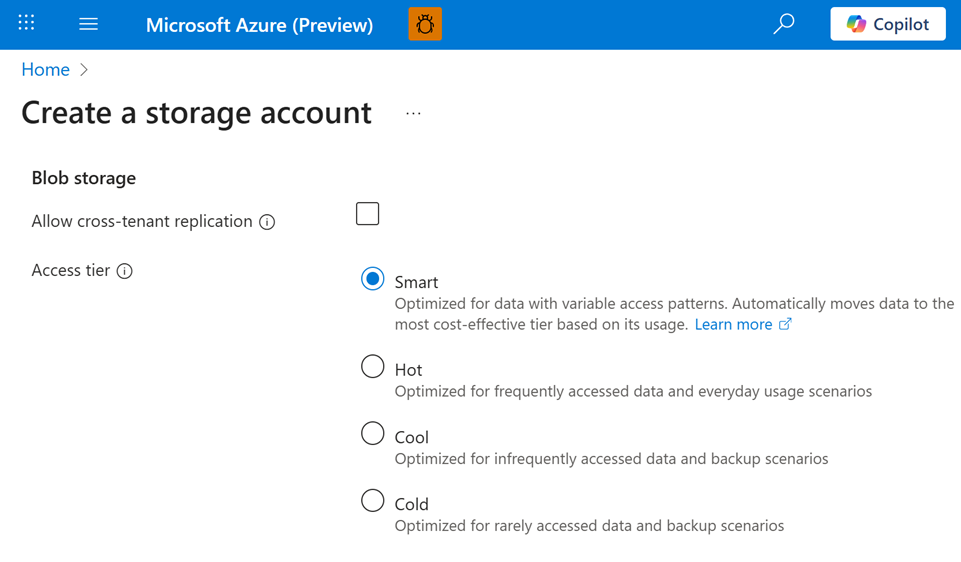
Smart tier is currently in public preview, and it represents a fundamentally different approach to storage cost optimization. Instead of writing lifecycle management policies based on age or prefix patterns, you simply enable smart tier at the account level and let Azure handle the rest. The system monitors access patterns and automatically moves blobs between hot, cool, and cold tiers to minimize costs while keeping data on online tiers for immediate access.
How Smart Tier Works
The concept behind smart tier is elegantly simple: store data where it costs the least based on how frequently you access it, and do this automatically without requiring you to predict access patterns upfront.
🔄 Smart Tier Lifecycle
Here's the detailed breakdown of each stage.
Initial Upload: Hot Tier
When you first upload a blob to a smart tier-enabled storage account, it lands in the hot capacity tier. This makes sense. New data is often accessed frequently right after creation (think application deployments, recent backups, or newly ingested data files).
30 Days Without Access: Cool Tier
If a blob goes 30 days without any access operations, smart tier automatically moves it to the cool tier. The transition happens behind the scenes, and your application continues accessing the blob through the same URLs and APIs. You don't need to change anything in your code.
90 Days Total Without Access: Cold Tier
After 90 days of total inactivity (60 more days beyond the initial 30), the blob transitions to the cold tier. This is the most economical online storage tier for data that's rarely accessed but needs to remain immediately available when needed.
Access Resets Everything: Back to Hot
Here's where smart tier gets interesting. The moment you access a blob (through operations like Get Blob or Put Blob), it immediately moves back to the hot tier and the 30-day timer resets. This ensures that data you're actively using always has the performance characteristics and availability SLAs of hot storage, while data you've forgotten about or archive automatically becomes cheaper over time.
What Counts as "Access"?
Not all blob operations are treated equally by smart tier. Understanding which operations affect tiering behavior is important for predicting costs and performance.
✅ Operations That Count as Access
- Get Blob - Downloading blob content
- Put Blob - Uploading or replacing content
These operations update last access time and trigger immediate move back to hot tier if in cool or cold.
❌ Operations That Don't Count
- Get Blob Properties - Reading metadata
- Get Blob Metadata - Checking attributes
- Get Blob Tags - Inspecting tags
These metadata operations don't affect tiering behavior or reset the timer.
This distinction is particularly useful for inventory systems or monitoring tools that need to inspect blob metadata without accidentally moving everything back to hot tier.
Eligibility and Requirements
Smart tier isn't universally available for all storage accounts. Microsoft rolled out the preview with specific constraints to ensure reliability and performance.
Supported Configurations
Zone-Redundant Storage
ZRS, GZRS, and RA-GZRS
All Namespaces
Flat and hierarchical (ADLS Gen2)
Block Blobs
Files, backups, application data
GPv2 Accounts
Standard general-purpose v2
What's Not Supported
LRS or GRS
Non-zone redundant storage
Archive Tier
Only hot, cool, cold supported
Premium Storage
Different performance tiers
Page Blobs
VHDs and similar workloads
If your GZRS account fails over to LRS during a disaster recovery scenario, you have 60 days to convert it back to zone-redundant to maintain smart tier support. This is important for business continuity planning.
Small Files Get Special Treatment
💡 Smart Design for Small Files
Blobs smaller than 128 KiB remain in the hot tier permanently and don't incur monitoring fees. This ensures smart tier makes economic sense for all workloads.
Why? Because moving small files between tiers would create more overhead than savings. The monitoring fee alone would exceed any storage cost benefit from moving a 50 KB file to cool tier. By keeping small files in hot tier, Microsoft ensures that smart tier makes economic sense for all workloads.
This also means that if you have millions of tiny log files or metadata blobs, you won't pay monitoring fees on them. Only blobs larger than 128 KiB contribute to the monitoring cost.
Enabling Smart Tier
Getting started with smart tier requires registering for the preview and then enabling it on your storage accounts.
Step 1: Register for the Preview
In the Azure portal, navigate to Preview Features and register for "Smart Tier (account level)". Preview access is being rolled out gradually, so registration doesn't guarantee immediate availability.
Step 2: Enable on Storage Accounts
Once you have access, smart tier is configured through the default account access tier setting. When you enable smart tier on an existing storage account:
- All blobs without an explicitly set access tier automatically move to smart tier management
- Blobs with an explicit tier (hot, cool, cold, or archive) remain in their current tier
- Newly uploaded blobs automatically use smart tier unless you specify otherwise
You can move blobs out of smart tier at any time by explicitly setting their access tier. However, once you set an explicit tier, you can't move the blob back to smart tier. It's a one-way door. To re-enable smart tier management, you'd need to delete and re-upload the blob (or change the default account tier and let new uploads use smart tier).
Important Note on Monitoring Fees
Smart tier charges a monitoring fee of $0.04 per 10,000 objects managed by smart tier (objects over 128 KiB). For a storage account with 1 million managed blobs, that's $4 per month in monitoring costs. This fee pays for the continuous access pattern analysis that makes automatic tiering possible.
When evaluating smart tier, compare this monitoring fee plus capacity costs against what you currently pay with static tier assignments or lifecycle management policies.
Cost Implications and Billing
Understanding how smart tier affects your Azure bill is critical for deciding whether to adopt it.
💰 What You Pay
🎉 What You Don't Pay
Capacity Billing
Blobs in smart tier are billed at the capacity rates of their underlying capacity tier. There's no separate "smart tier capacity meter." You pay standard pay-as-you-go rates based on where your data physically resides at any given time.
Transaction Billing
All access operations (reads, writes) against smart tier blobs are billed at hot tier transaction rates, even if the blob is currently in cool or cold tier. When you access a cold tier blob under smart tier management, it immediately moves to hot, and the transaction is billed as a hot tier operation.
This is simpler than manually managed tiering, where reading from cool or cold tier incurs both retrieval costs and transaction costs.
Reserved Capacity Doesn't Apply
Smart tier uses pay-as-you-go pricing exclusively. If you've purchased reserved capacity for hot or cool tier, those reservations won't apply to smart tier capacity. This is something to consider when comparing costs.
Interaction with Other Features
Smart tier changes how several Azure Storage features behave. Here's what works as expected versus what has special considerations.
✓ Works Independently
Soft deleted blobs continue transitioning to cooler tiers during retention period. Deleted data keeps moving to cheaper storage until permanently deleted.
⚠️ Special Behavior
Policies do not affect smart tier blobs. Use smart tier for general storage and lifecycle policies for workloads with predictable patterns.
Cannot influence smart tier decisions. Tiering is driven entirely by observed access patterns, not custom logic or external triggers.
Do not transition between capacity tiers. They remain in their initial tier to prevent performance issues with workloads that continuously append data.
Billed at full content length in current preview (unlike traditional tiering). Microsoft may adjust before general availability.
When Smart Tier Makes Sense
Smart tier isn't the right choice for every workload. Here's when it shines and when you should consider alternatives.
Ideal Use Cases
Unpredictable Access Patterns: If you can't confidently predict when data will be accessed, smart tier adapts automatically. Think user-generated content, backup files accessed on-demand, or datasets used by data scientists with varying schedules.
Development and Test Environments: Dev/test workloads often have bursty access patterns. An environment might be heavily used during development sprints and idle for weeks between projects. Smart tier optimizes costs without requiring you to manually tier down during idle periods.
Multi-Purpose Storage Accounts: When a storage account serves multiple applications with different access patterns, smart tier provides a single solution that adapts to each blob individually rather than applying blanket policies.
Simplicity Over Complexity: If you want cost optimization but don't want to invest time in designing, testing, and maintaining lifecycle policies, smart tier delivers 80% of the benefit with 5% of the effort.
When to Use Explicit Tiers or Lifecycle Management
Predictable Archival Workloads: If you know that data older than 180 days will never be accessed (like compliance archives), explicit archive tier placement is cheaper than smart tier's online tiers.
Hot-Only Performance Requirements: Applications with strict latency SLAs might not tolerate the delay when smart tier moves a blob from cold back to hot on access. Explicitly keeping these blobs in hot tier guarantees performance.
Cost-Optimized Long-Term Storage: For data that will sit untouched for years, archive tier (at $0.00099 per GB per month) is significantly cheaper than cold tier (around $0.004 per GB per month). Smart tier doesn't use archive, so you'd need lifecycle policies for deep archival.
Reserved Capacity Investments: If you've already purchased reserved capacity for hot or cool tier, you might want to assign tiers explicitly to take advantage of those reservations rather than using smart tier's pay-as-you-go model.
Monitoring Smart Tier Behavior
Once smart tier is enabled, you'll want visibility into how it's managing your data.
Storage Account Metrics
The Azure portal provides metrics showing how smart tier distributes your blobs across underlying capacity tiers. You can see:
- Blob count by tier (hot, cool, cold)
- Capacity by tier
- Transition activity over time
This visibility helps you understand whether smart tier is behaving as expected and whether the cost savings justify the monitoring fees.
Cost Analysis
Use Azure Cost Management to compare your storage spend before and after enabling smart tier. Look at:
- Capacity costs trending downward as data moves to cooler tiers
- Transaction costs (should remain steady since accessing blobs always uses hot tier pricing)
- The new monitoring operations line item
For most workloads, you should see capacity costs decrease enough to more than offset the monitoring fee within the first billing cycle.
Best Practices and Gotchas
Here are some lessons learned from early smart tier adopters.
When you enable smart tier on an account, avoid manually setting explicit tiers on individual blobs unless you have a specific reason. The benefit of smart tier is automatic management. Every blob with an explicit tier is something you are managing manually.
Remember that blobs under 128 KiB stay in hot tier and do not incur monitoring fees. If your workload consists primarily of small files, smart tier might not save as much as expected since most data never transitions to cooler tiers.
Applications that frequently read metadata (Get Blob Properties) will not affect tiering, but applications that repeatedly download full blob content will keep everything in hot tier. Understand your access patterns before enabling smart tier.
If you use GZRS for geo-redundancy, have a plan to convert failed-over LRS accounts back to zone-redundant within 60 days. Otherwise, you will lose smart tier support.
Enable smart tier on development or staging accounts before rolling it out to production. Monitor costs and behavior for a full billing cycle to ensure it meets expectations.
Looking Ahead: What Might Change
Smart tier is in public preview, which means characteristics might evolve before general availability. Microsoft has indicated that features like snapshot billing and tier transition timing could be adjusted based on customer feedback.
The preview is also currently limited to zone-redundant storage. It's likely that support expands to LRS and GRS accounts after general availability, making smart tier accessible to more workloads.
There's also potential for smart tier to support archive tier in the future, enabling truly hands-off lifecycle management from hot all the way to deep archival. For now, hybrid approaches (smart tier for online tiers, lifecycle policies for archive) are necessary.
The Bottom Line
Smart tier represents a shift from imperative to declarative storage management. Instead of telling Azure exactly when to move data between tiers, you're declaring that you want cost optimization and letting Azure figure out the details based on actual usage.
For workloads with unpredictable access patterns, many development environments, and multi-purpose storage accounts, smart tier can deliver significant cost savings with minimal operational overhead. The monitoring fee is small relative to capacity savings, and the elimination of tier transition fees and retrieval costs simplifies billing.
That said, smart tier isn't a silver bullet. Workloads with predictable archival patterns, strict performance requirements, or heavy investments in reserved capacity might be better served by traditional lifecycle management and explicit tier assignments.
The real power of smart tier is choice. You can enable it account-wide and opt out specific blobs that need manual management. Or you can use explicit tiers by default and opt in specific containers to smart tier. Azure Storage now supports both paradigms, letting you optimize for cost, performance, or operational simplicity based on what matters most for each workload.
If you've been putting off storage cost optimization because lifecycle policies felt too complex, smart tier is worth exploring. Sign up for the preview, enable it on a non-critical storage account, and watch how it adapts to your access patterns. You might be surprised by how much cost optimization can happen automatically when you stop trying to predict the future.
Resources: