Azure Copilot Gets Agents: The Game-Changer for Cloud Operations
If you've been working in Azure lately, you've probably noticed Azure Copilot becoming more capable with each update. But what Microsoft just unveiled in preview takes things to an entirely different level: Agents in Azure Copilot. This isn't just an incremental improvement; it's a paradigm shift that brings agentic AI directly into your Azure workflows.
What Makes Agents Different?
❓ Traditional AI Assistants
- Answer questions
- Provide guidance
- Suggest solutions
- Require manual execution
🤖 Azure Copilot Agents
- Take action
- Execute workflows
- Generate deployable artifacts
- Orchestrate multi-step processes
Traditional AI assistants answer questions and provide guidance. Agents take action. They reason through complex scenarios, orchestrate multi-step workflows, and intelligently surface the right capabilities at the right time. With agent mode enabled in Azure Copilot, you're no longer just getting answers; you're getting a virtual cloud solution architect that can plan, execute, and optimize your Azure environment.
Five Specialized Agent Categories
The preview introduces five specialized agent categories, each designed to handle specific operational domains:
Deployments & Infrastructure
Virtual solution architect that generates production-ready infrastructure plans and Terraform configs
Observability
Intelligent alert investigation with automated root cause analysis and remediation guidance
Optimization
Cost and carbon reduction recommendations with ready-to-deploy scripts
Resiliency
Proactive protection against failures with backup, recovery, and zone resiliency configuration
Troubleshooting
Root cause diagnostics with one-click fixes and automated support ticket creation
Let's dive into what each of these brings to the table and why this matters for anyone managing Azure workloads.
1. Deployments and Infrastructure: Your Virtual Solution Architect
The deployment agent serves as a virtual cloud solution architect, transforming high-level requirements into production-ready infrastructure. This capability goes far beyond template generation. It's about intelligent infrastructure planning grounded in the Azure Well-Architected Framework.
How It Works
💡 The Agent Workflow
- Clarifies requirements through multi-turn conversations
- Creates a detailed workload plan with pros, cons, and architectural trade-offs
- Generates Terraform configurations for all necessary components
- Provides deployment guidance including CI/CD pipeline recommendations
Start with a simple prompt like "I need a scalable web app with a SQL database," and the agent orchestrates the entire planning process.
The agent supports deployment planning for all Azure resource types, from simple virtual machines to complex multi-tier architectures involving compute, networking, storage, identity, monitoring, and orchestration.
Real-World Example Prompts
- "Host a sentiment-analysis LLM with Azure Functions for serverless API endpoints, connect to an Azure SQL Database for logging user interactions, and set up alerting for failed requests."
- "Deploy a microservices workload on AKS where API Gateway routes traffic, integrate with Azure Key Vault for secrets, and roll out canary deployments for new service versions."
GitHub Integration That Actually Makes Sense
Here's where it gets really practical: after Azure Copilot generates your Terraform configurations, you can:
GitHub PR
Create pull request directly to your repository
VS Code Web
Open files in browser-based VS Code
Download
Get files for local deployment
This tight integration with developer workflows means the artifacts Azure Copilot generates can seamlessly flow into your existing CI/CD pipelines.
Current Limitations
The deployment agent focuses on "greenfield" scenarios: deploying brand new infrastructure. It doesn't yet support importing or modifying existing infrastructure, though you can still get guidance for those scenarios. Generated artifacts are currently Terraform-only, and while pipeline guidance is provided, automated CI/CD integration isn't available yet.
2. Observability: Intelligent Alert Investigation
When alerts fire in production, every minute counts. The observability agent transforms alert response from a manual investigation process into an AI-assisted workflow that provides actionable insights fast.
How It Works
🔍 Alert Investigation Flow
- Creates an Azure Monitor issue to track the investigation
- Analyzes the alert context and related telemetry
- Provides a summary of findings with possible explanations
- Recommends remediation steps with links to detailed documentation
The agent integrates directly with Azure Monitor to investigate alerts. When you provide an alert (either by viewing it in the portal or providing the alert ID), the agent orchestrates a complete investigation.
You can watch the agent's reasoning in real-time by selecting "Show activity" during the investigation.
Sample Prompts
When viewing an alert in the portal:
- "Can you help investigate this alert?"
- "Start an investigation for this alert."
With a specific alert ID:
- "Troubleshoot this alert:
/subscriptions/.../providers/Microsoft.AlertsManagement/alerts/ALERT_ID"
What to Know
Currently, agent capabilities support Application Insights alerts only, with support for other alert types coming in future updates. The agent investigates and recommends solutions but doesn't yet automatically apply remediation steps. You remain in control of any changes.
3. Optimization: Cost and Carbon Reduction Made Easy
In an era where cloud costs and sustainability matter more than ever, the optimization agent helps you identify opportunities to reduce both spending and carbon emissions while maintaining performance.
Capabilities
Detailed Recommendations
For VMs and Virtual Machine Scale Sets
Alternative Options
Compare different optimization approaches
Impact Visualizations
Charts showing cost and carbon reductions
Deploy Scripts
PowerShell or Azure CLI ready to run
Integration Points
You can access optimization recommendations through:
- Direct prompts in Azure Copilot chat
- Operations Center (preview) where top recommendations are surfaced
- Azure Advisor cost recommendations page with "Optimize" buttons next to impacted resources
Example Prompts
- "Show me the top five cost-saving opportunities for subscription
aaaa0a0a-bb1b-cc2c-dd3d-eeeeee4e4e4e." - "Explain the recommendation for ContosoVM1."
- "Is there an alternate recommendation for ContosoVM1?"
- "Generate a PowerShell script to apply the recommended optimizations."
- "Summarize total potential cost and carbon reduction from all active recommendations."
Best Practices
For optimal results, include the subscription GUID or ARM Resource URI in your prompts rather than relying solely on resource names. The agent returns five recommendations by default, with a maximum of ten per query.
4. Resiliency: Proactive Protection Against Failures
The resiliency agent helps ensure your Azure resources can withstand and recover from failures, whether from cyber attacks, data corruption, or datacenter outages.
What It Covers
🛡️ Comprehensive Protection
Supported Resource Types for Scripts
Zone resiliency scripts are currently available for:
- Virtual Machines
- App Services
- Azure Database for PostgreSQL
- Azure Database for MySQL
- SQL Managed Instance
- Azure Cache for Redis
- Azure Firewall
Sample Prompts
- "Configure zone resiliency for this resource."
- "Which resources aren't zone-resilient?"
- "How many backup jobs failed in the last 24 hours?"
- "Which data sources don't have a recovery point within the last 7 days?"
- "Increase the security level of this vault."
Important Note
While the agent provides comprehensive guidance and scripts, some advanced capabilities like multi-user authorization and Azure Site Recovery require manual intervention. The agent guides you through these processes with detailed instructions.
5. Troubleshooting and Support: From Problem to Solution Faster
When things go wrong, the troubleshooting agent helps you diagnose issues quickly and often provides one-click fixes to resolve common problems.
How It Works
🔧 Diagnostic & Resolution Process
- Analyzes your specific environment to run root cause diagnostics
- Identifies the root cause of the issue
- Determines appropriate mitigation steps with tailored solutions
- Provides one-click fixes where possible for immediate resolution
- Creates support requests when additional help is needed, with all context pre-populated
Resource Coverage
The agent supports troubleshooting for all Azure resource types, with particularly strong capabilities for:
- Azure Cosmos DB
- Azure Virtual Machines
- Azure Kubernetes Service (AKS)
Example Scenarios
- "Help me troubleshoot why my Cosmos DB Cassandra API is failing."
- "I can't connect to my VM, can you help me troubleshoot?"
- "Investigate the health of my pods."
- "Identify reasons for high CPU or memory usage in my AKS cluster."
- "Create a support request for my problem."
What Makes It Special
The integration with Azure Support is brilliant. When the agent can't resolve an issue directly, it doesn't just tell you to open a ticket. It creates one for you with all diagnostic information already gathered. This dramatically reduces the time Microsoft Support needs to understand your issue and start helping.
Getting Started with Agents
Access to Agents in Azure Copilot is managed at the tenant level. For most tenants, access requests are automatically submitted, but availability is being rolled out gradually.
Enabling Agent Mode
Once your tenant has access:
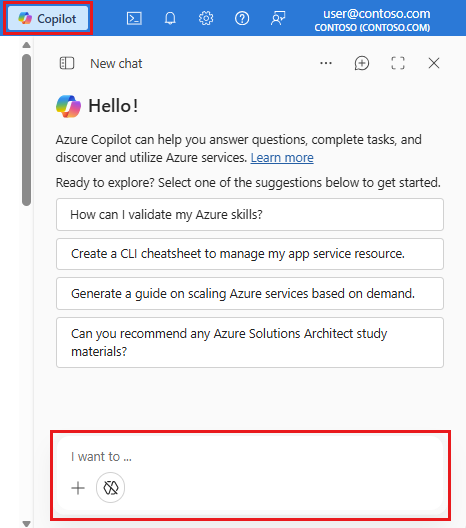
- Open Azure Copilot as you normally would
- Look for the agent mode icon in the chat window
- Select it to enable agent capabilities for the current conversation
With agent mode enabled, Azure Copilot intelligently routes your requests to the appropriate agent. You'll be asked to approve any actions before they're performed. Agents won't make changes without your explicit permission.
Current Limitations
- Full support is provided in English only, with limited support for other languages
- Not all functionality is available for every resource type
- Some capabilities are still preview-only for specific scenarios
Want earlier access? Microsoft has a feedback program you can join to help prioritize your organization, though submission doesn't guarantee access.
Why This Matters
We've had AI assistants in development tools for a while now, but Agents in Azure Copilot represents something fundamentally different. This isn't a bolt-on AI feature. It's deeply integrated into the Azure platform with full context awareness, native governance, and the ability to take action on your behalf.
🎯 The Complete Operations Lifecycle
Instead of juggling multiple disconnected tools and manual processes, you get a unified, AI-powered interface that brings together agents, context, and governance in one place.
Looking Forward
This is just the preview. As agent capabilities mature and expand to more resource types and scenarios, the way we manage cloud infrastructure will fundamentally change. The shift from imperative commands to declarative intent (from "do this specific thing" to "achieve this outcome") is already happening.
💭 The Paradigm Shift
For cloud engineers and solution architects, this means spending less time on repetitive operational tasks and more time on strategic initiatives. For organizations, it means faster deployments, better optimized resources, improved resilience, and reduced operational overhead.
The age of agentic cloud management has arrived. The question isn't whether to adopt it; it's how quickly you can get your team up to speed.
Resources: